I'd be a little nervous if I were SKYPE. Here is a free tip for SKYPE... quit screwing around and enable your mobile application across all smartphone OSs and all carriers with video conference and a whole lot more. If you don't have this worked out in the next 6 months... you might as well forget about it.
Showing posts with label gmail. Show all posts
Gmail Google Voice Integration: Call Phone Feature Live!
I'd be a little nervous if I were SKYPE. Here is a free tip for SKYPE... quit screwing around and enable your mobile application across all smartphone OSs and all carriers with video conference and a whole lot more. If you don't have this worked out in the next 6 months... you might as well forget about it.
Labels:
gmail,
Google,
google talk,
mobile experience,
News
Mobile Wishlist: Gmail App for iPhone
Jason Clarke over at TUAW vented in his entry "The iPhone needs a native Gmail application" that while iPhone's native mail application is one of the best mobile email program, it isn't good enough for Gmail largely because of the missing email threads feature which made Gmail popular. It's strange that Google has yet to release a true email application like they have for Palm, Windows Mobile and BlackBerry which includes the threaded email messages function.
I wonder if Google is holding out this to pursade people to switch over to the Android OS which features the best Gmail Application (dedicted!) on mobile.
Gmail IMAP for Treo 680
I've been trying to figure out a way to get IMAP setup on Treo 680 (without having to pay for a third party application). Since the default VersaMail email program version 3.55 doesn't play well with Gmail IMAP (only POP3), I started to do some research. Thankfully, I stumbled across this thread which lead me to this brilliant blog entry with step by step instruction which showed me how to obtain an updated VersaMail 4.01 that was intended for the Sprint Palm Centro users. I'll save the rant on why Palm chooses to single out Treo (Garnet 5.9.4 users) when it is the exact same OS as the Centro for next time.In short, you can just point your Blazer browser to this .PRC link or go through the steps recommended on Palm's Centro support page.
GMAIL IMAP settings can be found here
Update 7/21/08: I have been using VersaMail 4.01 for the past two days and have a very satisfied smile on my face as its working out great. IMAP support is a must have for smartphones. Don't know why Palm would not provide this as an update for Treo 680 users.
Gmail Freaking Out Tonight
Trying to check my Gmail right now, the inbox is freaking out. It kept on reloading and reloading... but all I get is a blank page that says"reloading".Mean while the status kept on rotating with the following status:"reading mail.google.com", "transfer mail.google.com", "waiting for mail.google.com"... ...
According to source, it is being attacked. But does the hack have anything to do with what I am seeing?
FYI - Problem only appeared to be with Firefox. IE6 is okay!
Gmail iPhone Updates
Apple made big waves yesterday with the launch of MacBook Air. What kept my interest going was the iPhone firmware upgrade (v 1.1.3). This upgrade has taken iPhone to new heights, I won't list all the options here, but feel free to check out Engadget for a comprehensive review. I will say that Google Maps on iPhone is closest thing to an emulated GPS device that is currently available.What I have noticed this morning in my Gmail inbox is the new iPhone Updates notification. Basically, Google formatted their Gmail to better suit iPhones (as they've been with all of their mobile interfaces). In this round of update, you get:
* Auto-complete when composing
* Automatic refreshing
* Faster load times when viewing email
I've been playing with the iPhone all morning including the new firmware update. It definitely leaves me wondering if my N95-3 on the way was a good choice. Ounce for ounce, there is not another device out there with such a sex appeal as the iPhone. Those of you who's made the 1.1.3 update will attest to the graphics engine when trying to re-arrange the homepage icons... amazing!
Gmail IMAP on WM6 Sucks
I have always felt that the mobile browser version of Gmail inbox is more than sufficient for my needs. Even on my AT&T 8525, it was more than capable of checking new messages and reply to friends and family. Being a self-claimed gadget freak and having the need to setup my mobile outlook to send emails (pictures, without paying for MMS fees, etc...), I decided to setup Gmail IMAP to see what it is all about, when I had WM5 installed, I was running Timewarner/Roadrunner POP3 mail.Google offered free IMAP back in late October. This service offers some benefits over traditional POP3 access. I've not tested this service using a desktop email application such as Outlook or Apple Mail, largely because the web-based Gmail works best in its native format within a browser. However, after setting this up on my 8525, I can't say its something to write home about. Here are some of my experience:
1. Setup for Windows Mobile 6 is very easy, following Google's instructions. I was up and running in less than 5 minutes.
2. Logging on to "Send and Receive" mail takes a while. Its not much longer than the standard POP3 procedure but given what I am about to say, it feels like I wasted a lot of time for nothing.
3. Blank emails received: I get alot of messages downloaded turn up blank. Some will give you the option to "download full message next time you sync online". Of all the emails that has prompted this message, only 1 or 2 have actually delievered. The rest of the times, I am still starring at blank messages. In the mean while, Gmail full version is recognizing this message as being Read, further confusing my experience.
4. Not in control: I've checked my Gmail setting to see if I can have a better understanding of how Gmail IMAP works. In a given time, I am not sure how many of the emails are being downloaded to my handset. I know at the time when I activated IMAP, I selected to download all new emails coming after that point in time. However, the actual number of emails downloaded after that point is a mystery to me. It changes in quantity based on its own logic. Even if I wanted to read older emails after my activation date, I don't think it would give me that ability.
Conclusion: my feedback is obviously based solely on WM6 Outlook. Your experience with a full blown Outlook or Thunderbird may be completely different. Perhaps, I'll find some time to explore that in the future just to find out for myself. Google products and applications for mobile are usually superb. I find this IMAP solution on my smartphone cumbersome, slow, and not all that effective. When I think of a cool IMAP solution, I often think of my work computer connecting via VPN or BlackBerry enterprise email and Gmail IMAP on mobile is definitely not that robust. To reliably check my Gmail, I'd still have to go through the mobile IE and I will continue to do so. I am sorry to say this, but at this point, Gmail IMAP, sucks!
(Update 2/15: According to IntoMobile, the problem with Gmail IMAP on WM5/6 is now fixed! GMail Team officially confirmed the problem has been rectified!)
(Update:2/15: I've posted a review of Gmail IMAP on a Symbian S60 Nokia N95, I am very happy with its performance there)
Gmail now available with IMAP Option
Gmail, by far the most innovative web-based email, has taken the marquee one step higher. Now offering IMAP as a feature. For those not familiar, an email server is typically setup as POP3 or IMAP. The typical email account from your local ISP (ie. Time Warner, Cox Communication, Earthlink, etc.) is usually POP3. That is, when new emails arrive, they are stored on the POP3 mail server until you read(retrieve) it, the moment you hit the send and receive button to retrieve it, the email the emails will be cleared from the POP3 server. So if you download the email from your personal computer, that email is going to stay with that computer; you will not be able to download it again or view it from the "webmail" option.IMAP is usually a more professional option. This is something your work email is likely to be set up as. The IMAP server is the host of the email, you can view(retreive) it via a webmail interface or from a computer or any other device that is configured to read the email. Unlike POP3 servers, retreiving an email from a personal device doesn't wipe the mail off of the server, giving you a wider mobility.
So back to the main story, Gmail is now available with this option. Some users claim that they are not seeing that option yet, while others are suggesting you to log on and off Gmail a couple of times to see that option. I am seeing this option fine within my "Settings"... see screen cap.
Labels:
gmail,
mobile experience
Gmail/m Updated Mobile Interface (For the Better!)
My 8525 is a must now days for me to kill the time in between waiting for the NY subways or an appointment. I am always using its 3G data connection to check my emails, news, scores and etc.I noticed Gmail has a much cleaner and user friendly interface. Prior to this screen shot, the inbox was difficult to manipulate using WM Internet Explorer. Now it has a nice display to differentiate emails from each other and a check box allows you to quickly move, or trash messages. Not a crazy update but much easier to use for users without a really nice GMail integration.
Labels:
gmail,
mobile experience,
mobile search
Gmail for Mobile Application Reviewed (Blackberry 8700c)
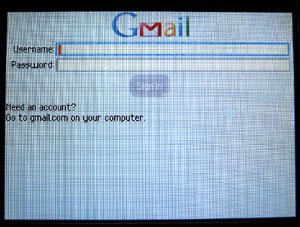
Google recently released an application that allows Java-enabled cell phones to download Gmail software directly by pointing their mobile browsers to www.gmail.com/app. The installation for my Blackberry 8700c was as easy as all previous Google Apps (Local and Google Talk). The software is remarkably simple to navigate and the overall looks and feels remain much the same as the Gmail we are all so fond of. Normally, I have been accessing Gmail through my phone's web broswer via http://m.gmail.com, while this worked, the mobile application promised to give me the best possible experience, I could not resist!

User Interface – The UI design is very nice. The scroll wheel on the Blackberry acts as the navigator. The font size by default is small, however, when the scroll wheel highlights a feature, the font size enlarges and bolds for easy viewing. There are a number of shortcut keys that allows a quicker access to features; for instance: "c" for compose mail, "i" for inbox, "d" for delete. I assume those are probably the only short keys that I'll use frequently enough to remember. Other obscure shortcut keys includes: "s" for star/unstar a conversation, "y" for archiving, "!" for reporting spam and lots more. There was one shortcut key that was against the default Blackberry shortcut key. Normally, pressing the "space" key in Blackberry act as a PageDown key, in the case for Gmail, it acts as an enter key whereby opening an email instead of scrolling down. This will take a while for me to get used to.

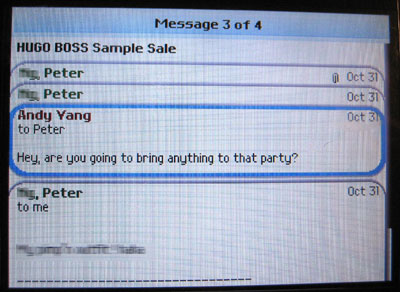
Receiving Email - New emails are marked in bold type. The inbox can be refreshed manually or it automatically refreshes after you have sent an email. According to the Gmail Help Center, this application will only prefetch 50KB worth of data at a time, you can also turn that feature off if you have a limited data package. The email conversations are stacked just like its desktop sibling, again, Google kept that same touch and feel into this version and that is something I really enjoyed.

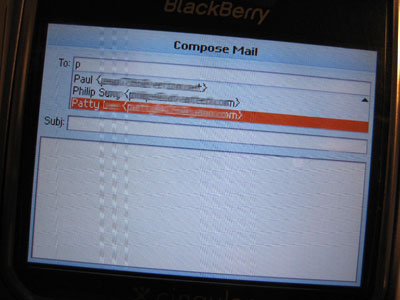
Composing Email - Composing an email is easy, the screen is very intuitive. A box for recipient email, subject and email body is presented by default. You can also add a cc/bcc box as an option. The auto-fill address function works just like desktop Gmail would, I think its little features like this that make all of Google's mobile applications valuable. Its clear that the developers at Google understands auto populating email addresses makes a mobile users task much easier, kudos!. The application doesn't allow me to save an email as draft, this is something that should have been in place as I often need pull other references from inbox to complete an email. Sending the actual email doesn't take much longer than it would through Blackberry's default email capability. In fact, I was surprised to see Gmail available for Blackberry devices as it could be considered as somewhat of conflict of interest. Perhaps Gmail is considered a personal application whereas Blackberry push-email is considered professional application.

Other Features - Pretty much all of Gmail's features have been incorporated, this includes: stars, labels, search, archive, report spam, and read/unread. I have notice that contacts did not make it to this version. While the emails from my contacts automatically populates while composing an email, it would still be nice to have access to the contacts to get information such as physical address or phone number. In addition to standard features, Gmail supports attachement viewing, I tested MS Word, Excel and PDF files and they work flawlessly, Gmail turns these documents into plain text, which works for reading the content but not powerful enough if your job relies these documents.
Again, I am satisfied by the sheer simplicity and functionality of this Google mobile application. While I am not certain how will this play into Google's advertising plan, I wouldn't be suprised to see more features rolled out in future releases which may include Google's text ads. I think there is definitely enough screen real estate to have small text ads such as the Google Mobile Ads. Once again, my windows-powered mobile devices will have to sit out and continue to use the browser version of Gmail.
Update: I found a reference from The Mobile Gadeteer where the author tested this application on a Windows-powered TMobile Dash and it worked. My Dell AXIM X30 stopped working ever since it reached its 1 year mark, so I can't test it out for myself.

User Interface – The UI design is very nice. The scroll wheel on the Blackberry acts as the navigator. The font size by default is small, however, when the scroll wheel highlights a feature, the font size enlarges and bolds for easy viewing. There are a number of shortcut keys that allows a quicker access to features; for instance: "c" for compose mail, "i" for inbox, "d" for delete. I assume those are probably the only short keys that I'll use frequently enough to remember. Other obscure shortcut keys includes: "s" for star/unstar a conversation, "y" for archiving, "!" for reporting spam and lots more. There was one shortcut key that was against the default Blackberry shortcut key. Normally, pressing the "space" key in Blackberry act as a PageDown key, in the case for Gmail, it acts as an enter key whereby opening an email instead of scrolling down. This will take a while for me to get used to.

Receiving Email - New emails are marked in bold type. The inbox can be refreshed manually or it automatically refreshes after you have sent an email. According to the Gmail Help Center, this application will only prefetch 50KB worth of data at a time, you can also turn that feature off if you have a limited data package. The email conversations are stacked just like its desktop sibling, again, Google kept that same touch and feel into this version and that is something I really enjoyed.

Composing Email - Composing an email is easy, the screen is very intuitive. A box for recipient email, subject and email body is presented by default. You can also add a cc/bcc box as an option. The auto-fill address function works just like desktop Gmail would, I think its little features like this that make all of Google's mobile applications valuable. Its clear that the developers at Google understands auto populating email addresses makes a mobile users task much easier, kudos!. The application doesn't allow me to save an email as draft, this is something that should have been in place as I often need pull other references from inbox to complete an email. Sending the actual email doesn't take much longer than it would through Blackberry's default email capability. In fact, I was surprised to see Gmail available for Blackberry devices as it could be considered as somewhat of conflict of interest. Perhaps Gmail is considered a personal application whereas Blackberry push-email is considered professional application.

Other Features - Pretty much all of Gmail's features have been incorporated, this includes: stars, labels, search, archive, report spam, and read/unread. I have notice that contacts did not make it to this version. While the emails from my contacts automatically populates while composing an email, it would still be nice to have access to the contacts to get information such as physical address or phone number. In addition to standard features, Gmail supports attachement viewing, I tested MS Word, Excel and PDF files and they work flawlessly, Gmail turns these documents into plain text, which works for reading the content but not powerful enough if your job relies these documents.
Again, I am satisfied by the sheer simplicity and functionality of this Google mobile application. While I am not certain how will this play into Google's advertising plan, I wouldn't be suprised to see more features rolled out in future releases which may include Google's text ads. I think there is definitely enough screen real estate to have small text ads such as the Google Mobile Ads. Once again, my windows-powered mobile devices will have to sit out and continue to use the browser version of Gmail.
Update: I found a reference from The Mobile Gadeteer where the author tested this application on a Windows-powered TMobile Dash and it worked. My Dell AXIM X30 stopped working ever since it reached its 1 year mark, so I can't test it out for myself.
Labels:
Blackberry,
gmail,
google talk,
mobile apps,
mobile apps reviews,
reviews
Subscribe to:
Posts (Atom)
Popular Posts
- 199 iphone wall paper
- Scanbuy Announces Addition to Its Board of Directors
- Millions of Names Available for .Co Open Registration
- YouTube Mobile 3G Enhancements & Java Beta Launchd.
- What a wonderful Second Life!
- Google Wave: First impressions
- Nokia N8 + Bluetooth Keyboard + Mouse
- Developers unhappy over Oracle Android suit
- Caribou Coffee to Use Cellfire for Mobile Coupon Offer
- Catching up: 8 random things about me